How to integrate Google Analytics with Sngine?
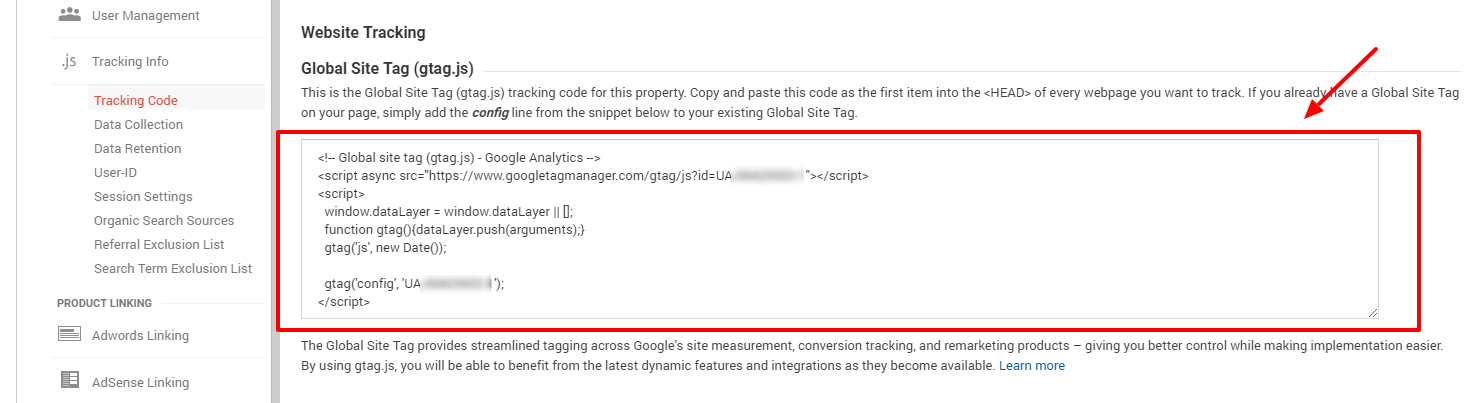
To integrate Google Analytics with Sngine it’s very simple. 1- Copy the tracking code from your Google Analytics

To integrate Google Analytics with Sngine it’s very simple.
1- Copy the tracking code from your Google Analytics Dashboard
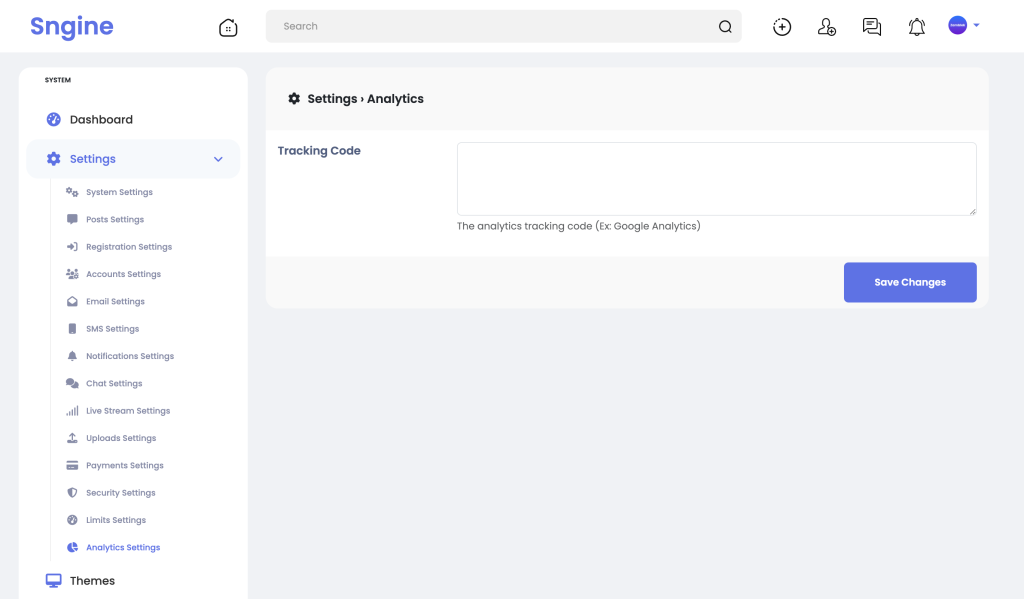
2- From Sngine Admin Panel -> Settings -> Analytics Settings paste the code and click Save Changes
That’s it.
Happy Sngine 🙂
Buy Sngine or Extend your support: https://bit.ly/BuySngine
Articles connexes
Premiers pas, Conseils et tutoriels
How Sngine Helps Combat Spam
 Zamblek
3 min de lecture
Zamblek
3 min de lecture
Premiers pas, Conseils et tutoriels
How To Set CORS Policy For Google Cloud Bucket?
Zamblek
1 min de lecture
Premiers pas, Conseils et tutoriels
New Google Playstore’s 12 Testers Policy for Production Release
Zamblek
1 min de lecture