How to fix Sorry, can not upload the file error?
If you got such error while you or your users try to upload photos, sounds, videos


If you got such error while you or your users try to upload photos, sounds, videos or files
First of all make sure that the uploads folders has the permissions 0777 recursively which means all sub-folders inside the uploads folders also should have the 0777 permissions.
You can find the uploads folder here: content/uploads
Example:
In the following screenshots the uploads folder itself has 0777 but some of his sub-folders don’t have 0777 permissions
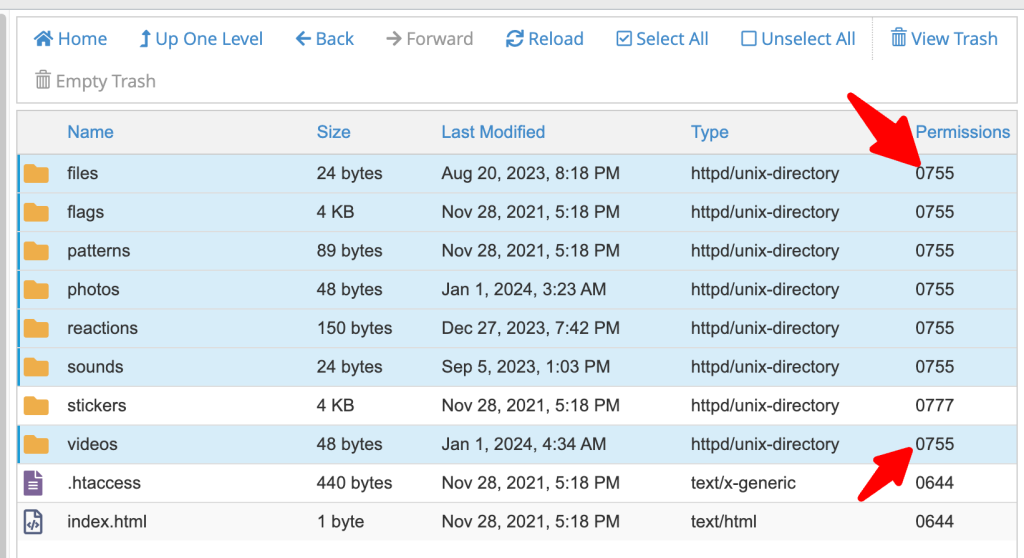
The sub-folders that should have 0777 permissions are: files, photos, sounds, videos
Finally you can check the uploading limits from your server, To learn more check this tutorial:
That’s it.
Happy Sngine 🙂
Buy Sngine or Extend your support: https://bit.ly/BuySngine