Par kanukp
Plugin Updated to 2.5.1 (Sngine v4.4.1) Jeevika is a powerful Creator Studio & Analytics Dashboard plugin for the users of Sngine-powered social net
Par zoon11
$19.00
Plugin Updated to 2.5.1 (Sngine v4.4.1)
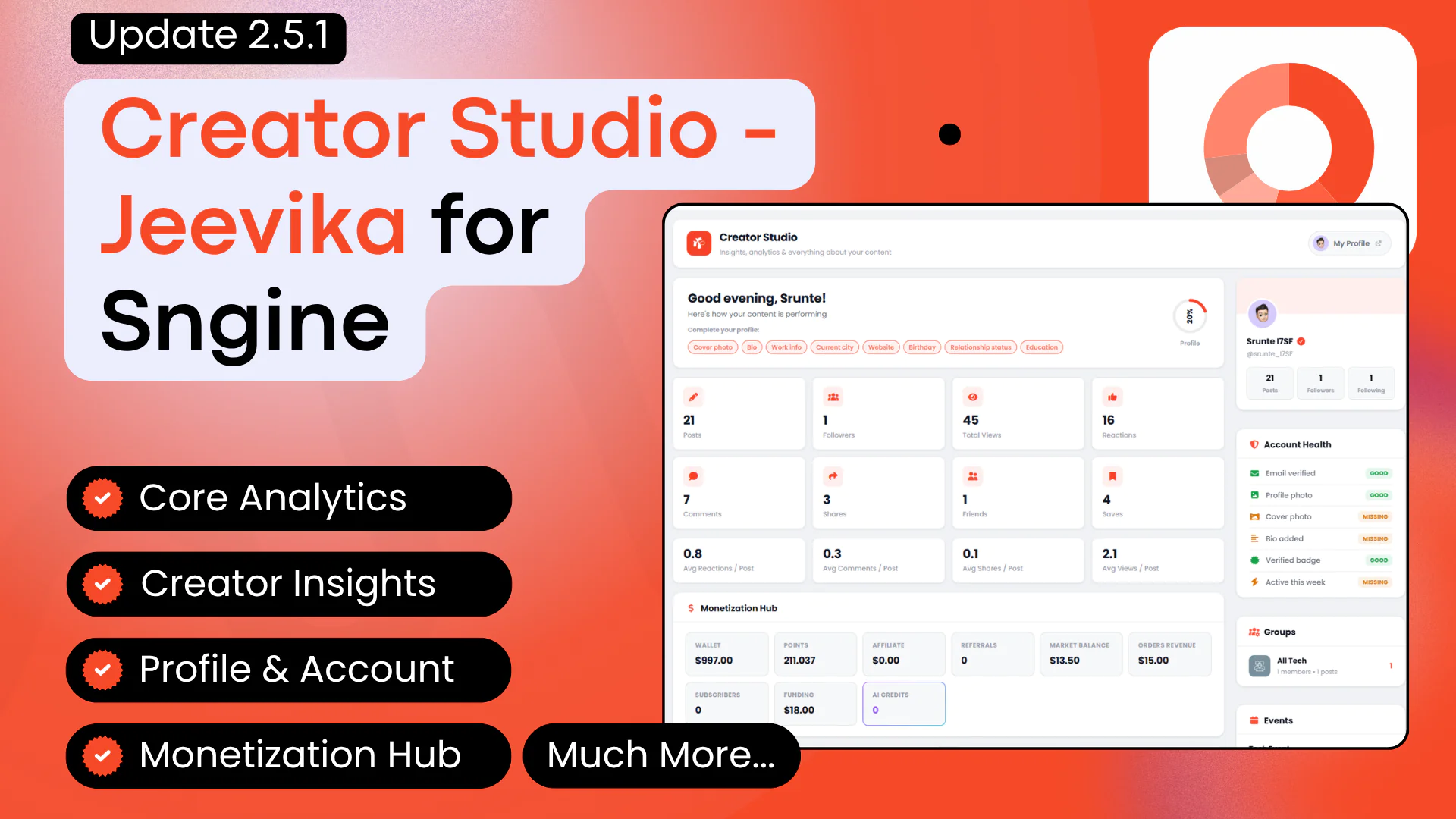
Jeevika is a powerful Creator Studio & Analytics Dashboard plugin for the users of Sngine-powered social networks. The plugin gives every logged-in user a comprehensive analytics hub featuring engagement insights, content performance breakdowns, monetization tracking, account health checks, and much more. Accessible directly in the user header menu.
Inspired by creator dashboards from major platforms, Jeevika equips your users with the tools to understand their presence and grow their audience — all without or creating new database tables.
Please Note:
The plugin colors can be changed by the admin (explained in the installation video)
This plugin doesn’t make any changes to the database, but it adds a slight code in 2 Sngine files, explained below:
.htaccess: In this file, 2 lines of code will be added for the /dashboard URL to work
Content/themes/default or xngine /templates/_user_menu.tpl: Here, just a new user menu will be added so that users can access the Creator Studio from the header menu from any page on your site.
Jeevika works perfectly fine with the default and Xngine theme. So, if you have any other custom theme instead of these 2, or if you’ve already made custom changes to the files explained above, then please send us a ticket after purchase, and we’ll guide you.
We also offer free installation with Extended license, not just once but every time you update Sngine until your support is active.
## Features For Users
Core Analytics
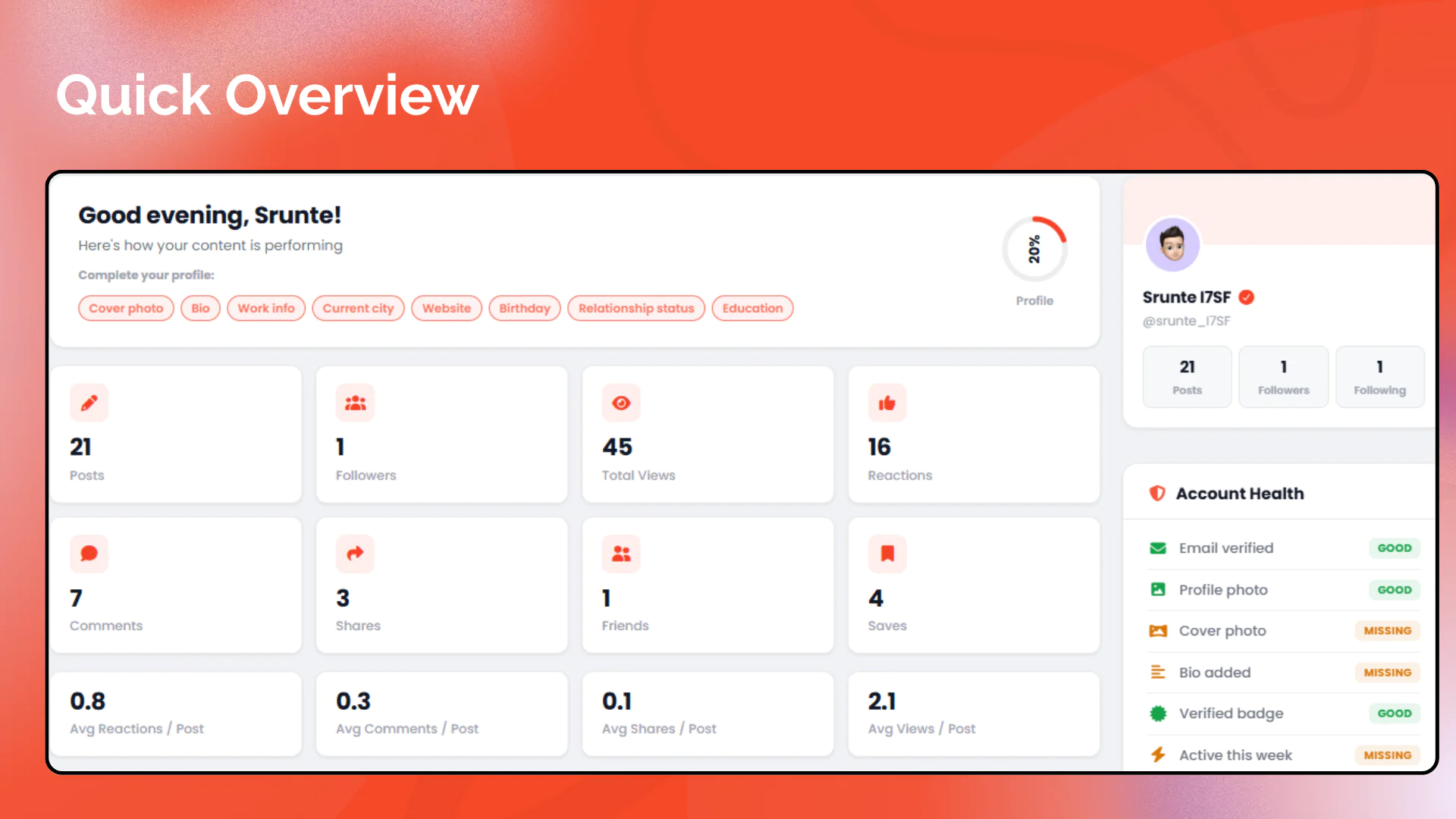
Overview Stats: Total posts, friends, followers, following, reactions, comments, shares, and views at a glance
Average Engagement Metrics: Reactions, comments, shares, and views per post
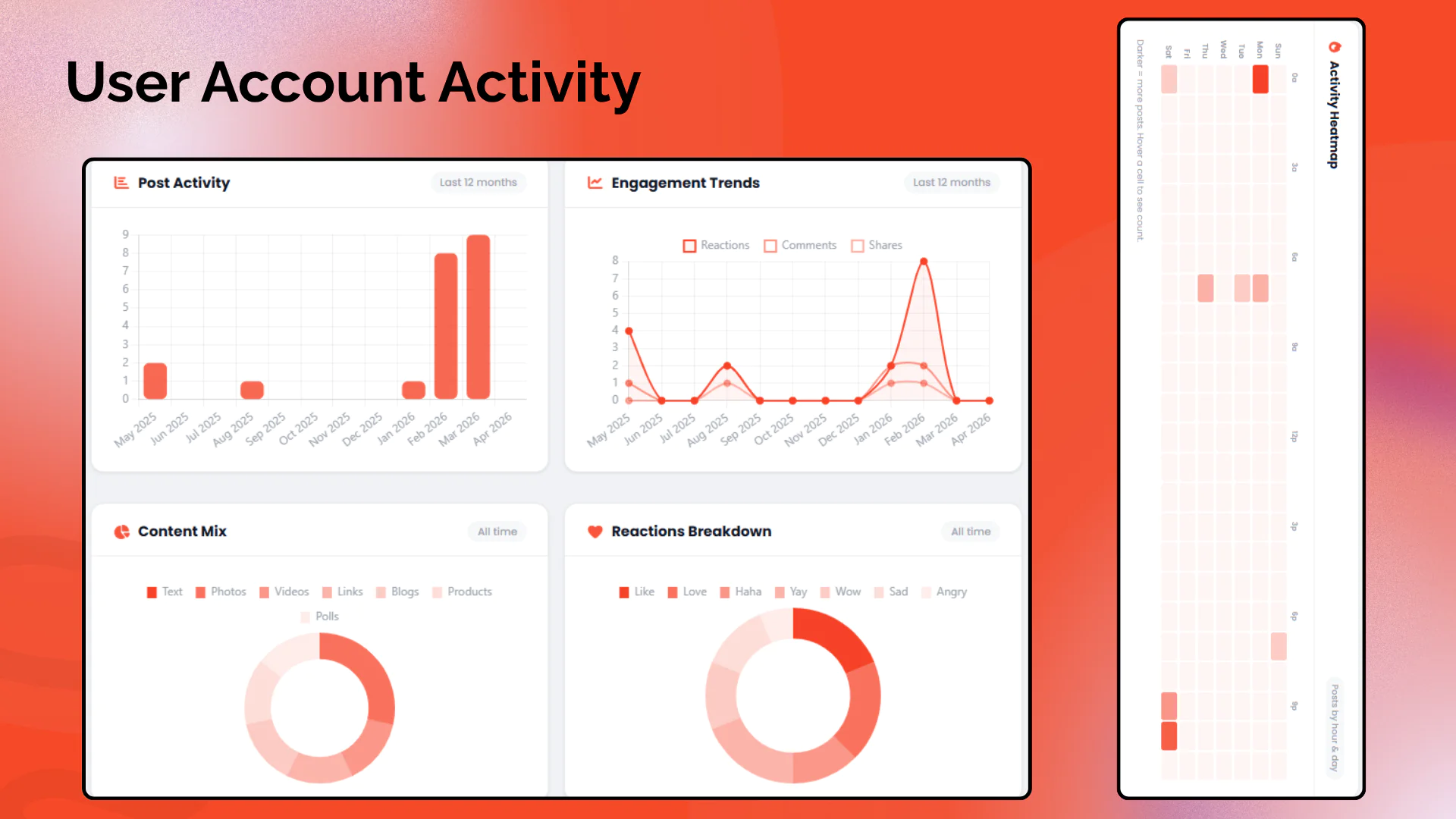
Post Activity Chart: Bar chart showing posting frequency over the last 12 months
Engagement Trends: Line chart with fill tracking reactions, comments, and shares over time
Content Mix Chart: Doughnut chart showing distribution of post types (text, photos, videos, links, blogs, products, polls)
Reactions Breakdown: Doughnut chart showing all reaction types (like, love, haha, yay, wow, sad, angry)
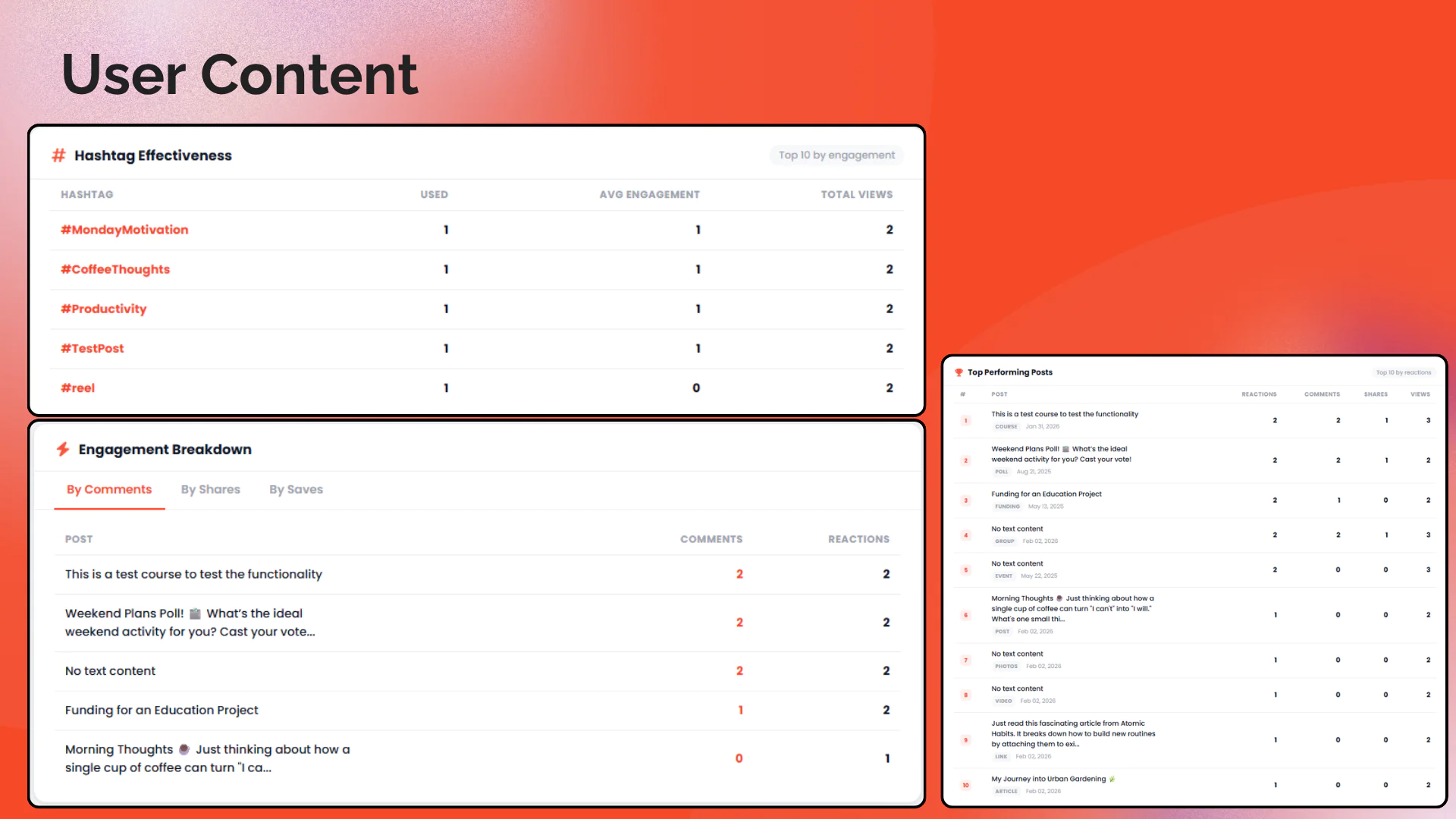
Top Performing Posts: Table of the 5 best posts ranked by total reactions
Recent Posts: Latest 5 posts with engagement stats and post type icons
2. Creator Insights
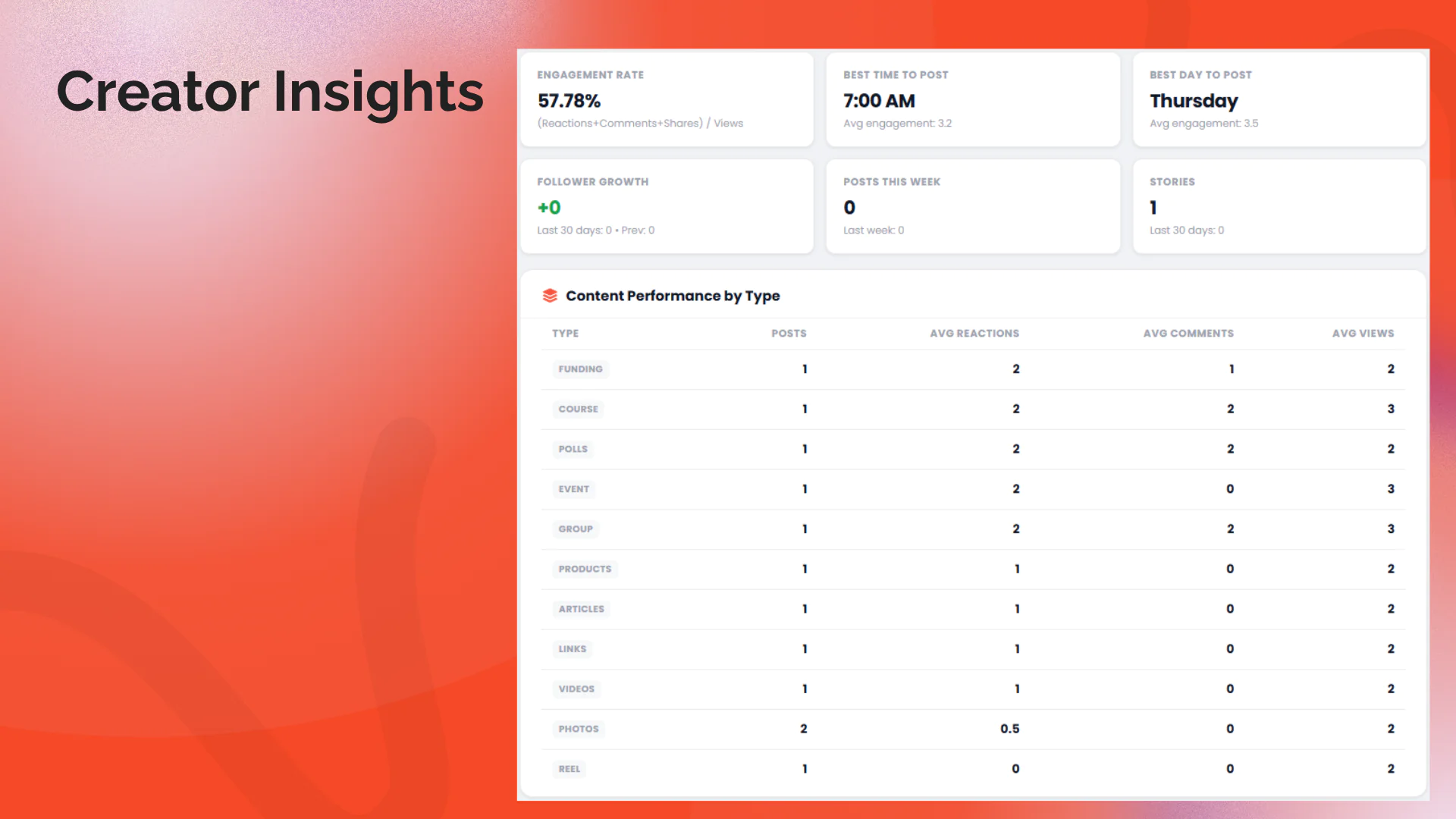
Engagement Rate: Overall engagement percentage calculated as (reactions + comments + shares) / views
Best Time to Post: Hour of day with highest average engagement
Best Day to Post: Day of week with highest average engagement
Posts Saved by Others: How many times other users bookmarked your posts
Follower Growth: Last 30 days vs. previous 30 days with trend indicator
Week-over-Week Comparison: This week vs. last week post count with trend arrows
Stories Stats: Total stories and last 30 days count (if Stories are enabled)
Content Performance by Type: Table showing average reactions, comments, and views per content type
3. Activity Heatmap (NEW in v2.5.0)
7×24 Hour/Day Grid: Visual heatmap showing when you post most, by day of week and hour of day
Hover Tooltips: Hover any cell to see the exact post count for that slot
4. Hashtag Effectiveness (NEW in v2.5.0)
Top 10 Hashtags: Ranked by average engagement per post
Usage Count & Total Views: Shows how often each hashtag was used and its cumulative views
5. Follower Demographics (NEW in v2.5.0)
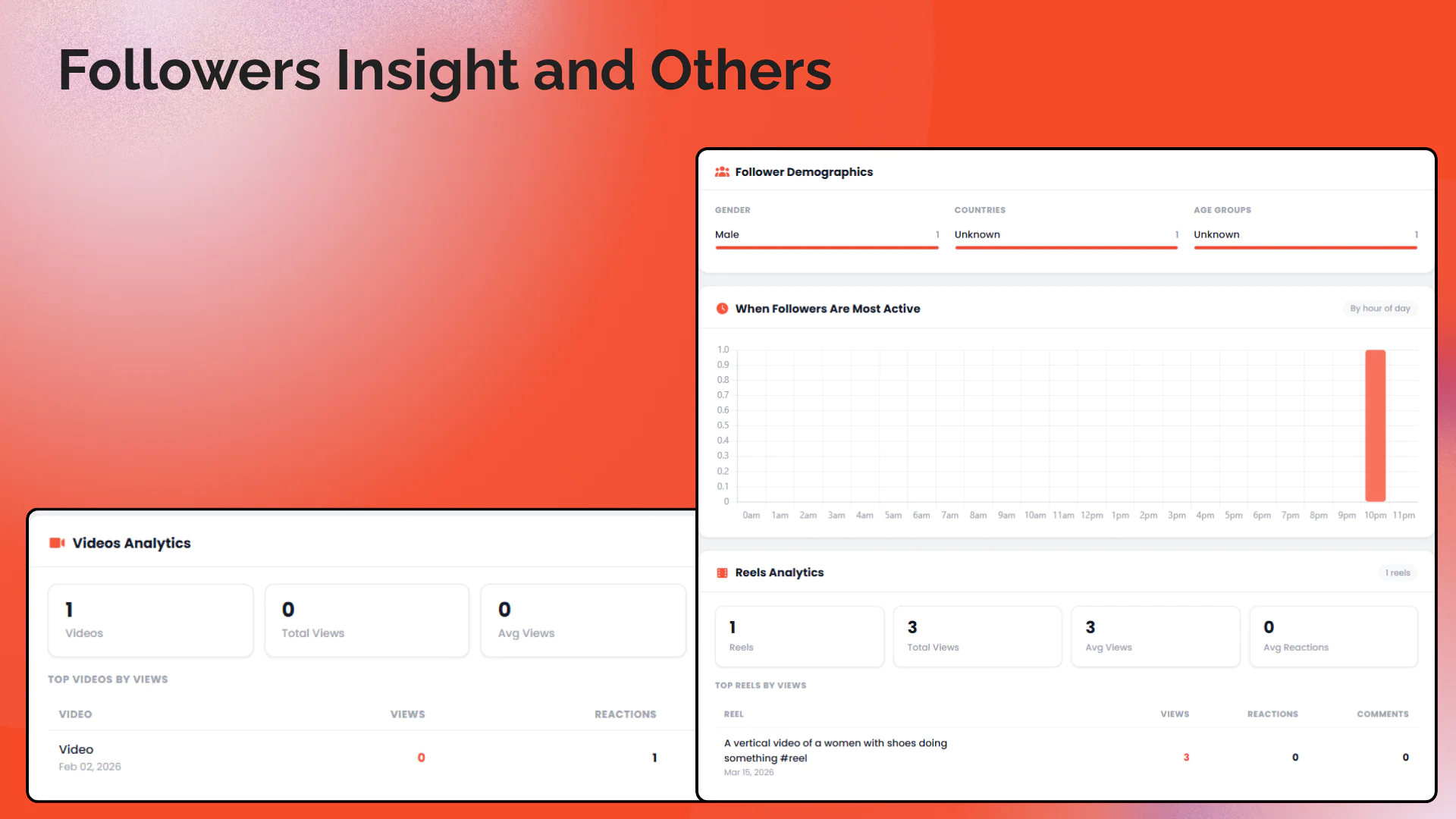
Gender Breakdown: Proportional bar chart of follower gender distribution
Top 8 Countries: Where your followers are from, with proportional bars
Age Groups: Distribution across 6 age brackets (Under 18, 18–24, 25–34, 35–44, 45–54, 55+)
6. When Followers Are Most Active (NEW in v2.5.0)
Activity by Hour: Bar chart showing follower last-seen distribution across all 24 hours of the day
Optimize Posting Time: Helps creators post when their audience is online
7. Engagement Breakdown (NEW in v2.5.0)
Top Posts by Comments: 5 posts that generated the most discussion
Top Posts by Shares: 5 most shared posts
Top Posts by Saves: 5 most bookmarked posts
Tabbed Interface: Switch between categories in one compact card
8. Reels Analytics (NEW in v2.5.0, conditional)
Reel Stats: Total reels, total views, average views, average reactions
Top 5 Reels by Views: Table of best-performing reels
Conditional: Only shown when Sngine's Reels feature is enabled
9. Videos Analytics (NEW in v2.5.0, conditional)
Video Stats: Total videos, total views, average views, average reactions
Top 5 Videos by Views: Table of best-performing videos
Conditional: Only shown when Sngine's Videos feature is enabled
10. Revenue by Day (NEW in v2.5.0, conditional)
30-Day Revenue Chart: Bar chart of daily marketplace order revenue (delivered orders)
Conditional: Only shown when Sngine's Marketplace is enabled
11. Profile & Account
Header Menu Integration: "Creator Studio" link added to Sngine's user dropdown menu with the studio icon for easy access from any page
Time-based Greeting: Personalized "Good morning/afternoon/evening" with user's first name
Profile Completeness Ring: SVG ring showing profile completion percentage (0-100%) with missing items listed
Account Health Checks: Visual checklist for email verification, profile photo, cover photo, bio, verified badge, and recent activity
Profile Sidebar Card: User avatar, name, username, and key stats (posts, followers, following)
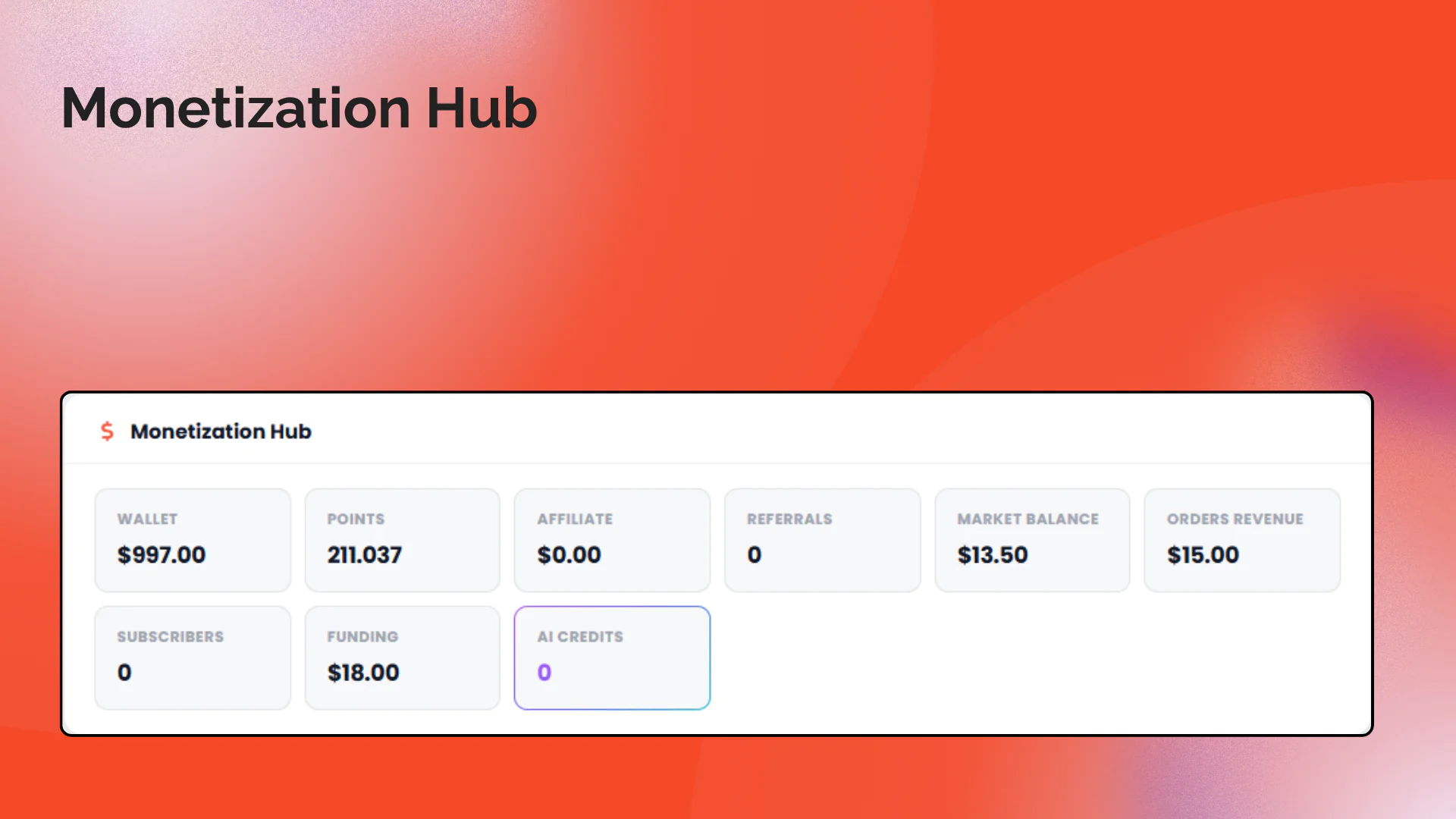
12. Monetization Hub (Conditional)
Wallet Balance: Current wallet balance (if Wallet system is enabled)
Points: User's points balance (if Points system is enabled)
Affiliate Earnings: Affiliate commission balance (if Affiliates system is enabled)
Marketplace Revenue: Marketplace sales balance and order count (if Market is enabled)
Funding Received: Total funding/donations received
Subscribers Count: Number of paid subscribers (if Monetization is enabled)
Referrals Count: Total affiliate referrals
Orders Revenue: Total completed order revenue
13. Pages, Groups & Events
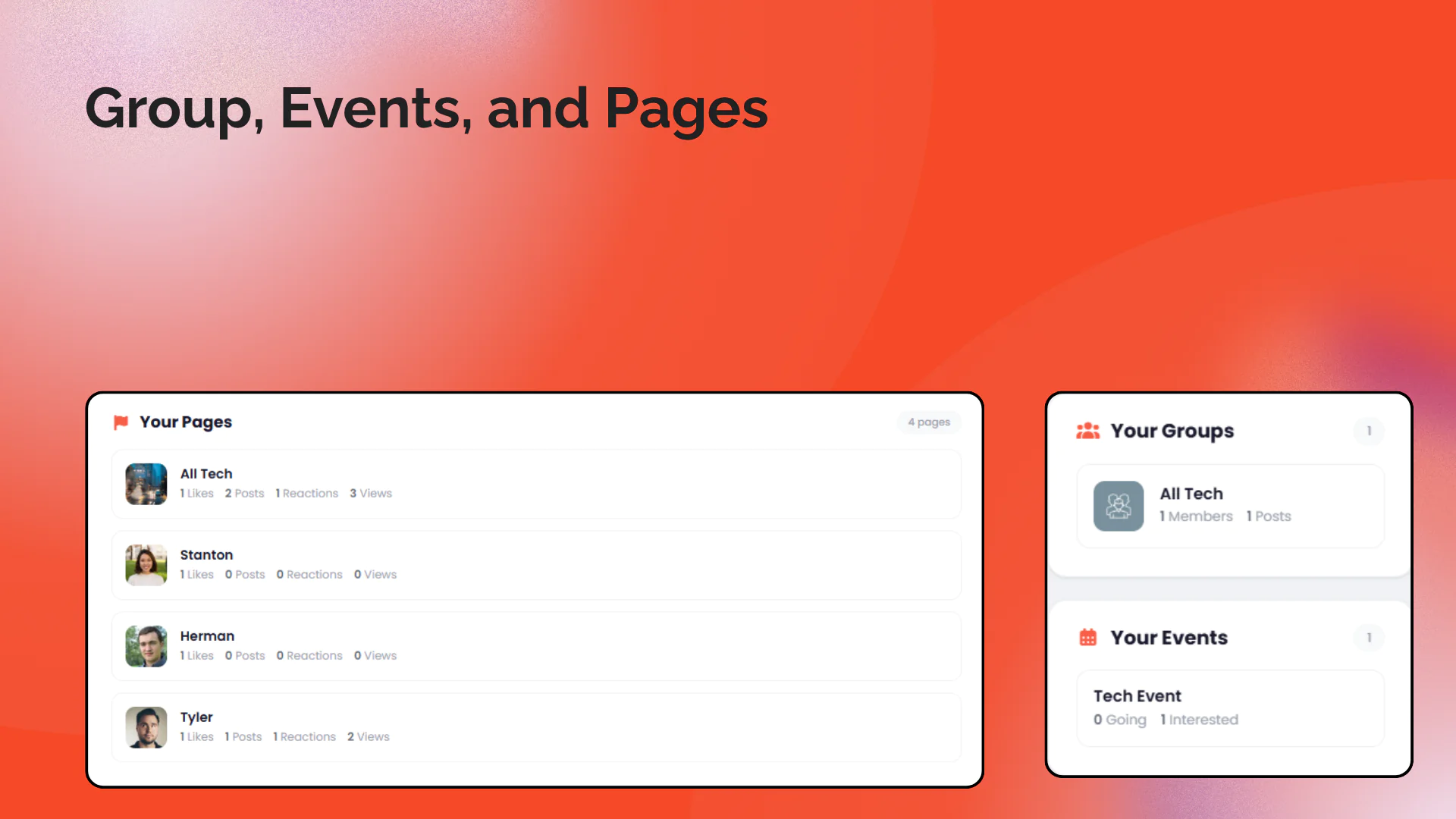
Pages Analytics: For page admins: likes, posts, reactions, comments, and views per managed page
Groups Analytics: For group admins: member and post counts per group
Events Analytics: For event admins: going, interested, and post counts per event
Smart Layout: Pages with 3 or fewer show in sidebar; more than 3 display in full-width main area
14. Pro Package Access Control
Restrict to Pro Packages: Optionally limit Creator Studio access to users with specific subscription packages
Package Selection: Admin can select which packages unlock access to the Creator Studio
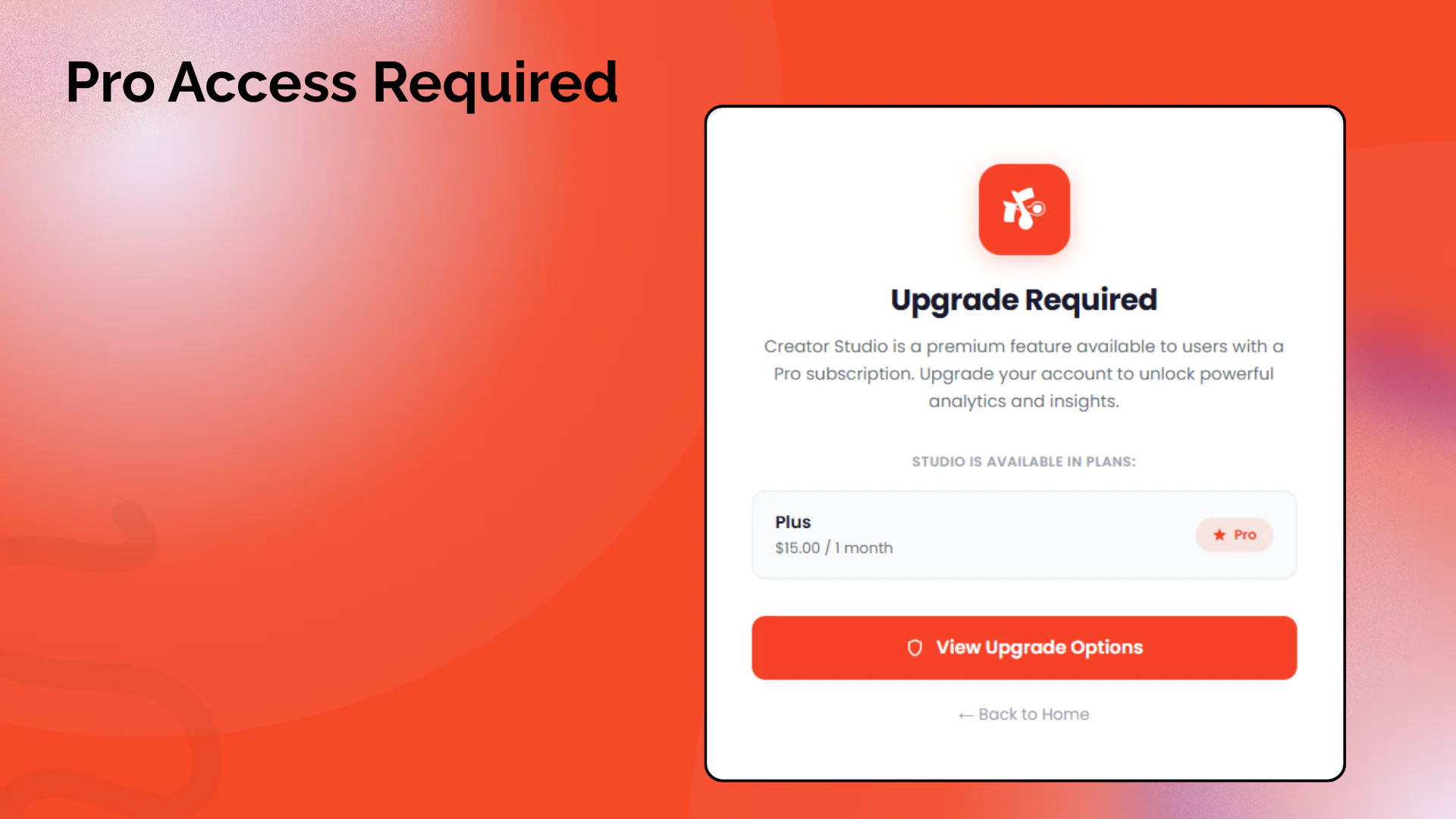
Upgrade Page: Non-eligible users see a professional upgrade prompt with package options
Backward Compatible: Disabled by default; all logged-in users have access until admin enables restrictions
Admin Override: Administrators always have full access regardless of package settings
15. Sngine Admin Settings
Color Mode Selection: Choose between "Auto" (from Sngine theme) or "Custom" color
Custom Color Picker: Visual color picker with hex input for setting a custom primary color
Live Preview: Real-time preview of how the selected color will look on dashboard elements
Settings Persistence: Settings saved to `settings.json` file (no database required)
Settings Page Admin-Only Access: Settings page restricted to administrators only with CSRF protection
16. Design & Compatibility
Modern Card-Based Design: Clean, professional layout with cards, icons, and smooth hover effects
Fully Responsive: Works on desktop, tablet, and mobile with adaptive grid breakpoints
100% Theme-Driven Colors: All icons, charts, badges, stat cards, and decorative elements derive their color from Sngine's primary color or admin-configured custom color. Zero hardcoded decorative colors.
Night Mode Support: Full dark mode support via CSS custom properties
Chart.js v4: Charts use monochromatic shades of the primary color (CDN loaded, theme-aware tooltips)
No Database Changes: Uses existing Sngine database tables only; settings stored in JSON file
Installation:
A detailed step-by-step guide is included in the plugin files after you make the purchase. A video installation guide will also be available, and a quick features analysis and color settings are included in the video too.
File structure is explained in the README file.
## Conditional Features
Jeevika intelligently shows/hides sections based on your Sngine configuration:
| Feature | Shown When |
|---|---|
| Stories Stats | `stories_enabled = true` |
| Monetization Hub | Any of: `monetization_enabled`, `wallet_enabled`, `points_enabled`, `affiliates_enabled` |
| Wallet Balance | `wallet_enabled = true` |
| Points | `points_enabled = true` |
| Affiliate Earnings | `affiliates_enabled = true` |
| Marketplace Revenue | `market_enabled = true` |
| Pages Analytics | `pages_enabled = true` and user is a page admin |
| Groups Analytics | `groups_enabled = true` and user is a group admin |
| Events Analytics | `events_enabled = true` and user is an event admin |
| Subscribers Count | `monetization_enabled = true` and user has monetization enabled |
| Pro Package Settings | `packages_enabled = true` (shown in settings page) |
| Dashboard Access | User has an allowed package OR `pro_package_control = false` (default) OR user is admin |
## Security
CSRF protection is implemented on all forms using Sngine's session secret token
All database queries use Sngine's `secure()` function for SQL injection prevention
Settings input (hex color) is validated server-side with regex before saving
The plugin does not expose any sensitive data — each user only sees their own analytics
No external API calls or data transmission — all analytics are computed locally from the database
## Frequently Asked Questions
Q: Does this add any new database tables?
A: No. Jeevika works entirely with existing Sngine database tables (posts, users, followings, pages, groups, events, stories, subscribers, orders, etc.).
2. Q: Can non-admin users see the dashboard?
A: Yes. The `/dashboard` URL is accessible to all logged-in users. Each user sees only their own analytics data. Only the installer and settings pages are restricted to administrators.
3. Q: What if I don't have monetization/stories/pages enabled?
A: The dashboard intelligently hides sections for disabled features. If monetization is off, the Monetization Hub won't appear. If stories are disabled, stories stats are hidden. The dashboard adapts to your Sngine configuration.
4. Q: Will the colors match my theme if I change the Sngine primary color?
A: By default (Auto mode), yes. The primary color is read server-side from Sngine's configuration and injected into the page. If you've set a custom color in the settings page, that will be used instead.
5. Q: How do I set a custom color for the dashboard?
A: Navigate to `/plugins/jeevika/settings.php` as an administrator, select "Custom Color" mode, pick your desired color, and click "Save Settings". The dashboard will use your custom color instead of the Sngine primary color.
6. Q: Can I restrict Creator Studio to paid subscribers only?
A: Yes! Navigate to Plugin Settings and enable "Restrict to Pro Packages". Select the packages that should have access. Users without an allowed package will see a professional upgrade prompt instead of the dashboard.
7. Q: What if I enable Pro Packages but want everyone to still access the dashboard?
A: Simply leave the "Restrict to Pro Packages" toggle OFF (which is the default). All logged-in users will have access regardless of their package.
8. Q: Do administrators need a Pro Package to access the dashboard?
A: No. Administrators always have full access to the Creator Studio regardless of any Pro Package restrictions.
9. Q: I don't use Pro Packages. Will the plugin still work?
A: Absolutely. The Pro Package feature is completely optional. If Sngine's packages system is disabled or you don't enable the restriction, the plugin works exactly as before — all logged-in users have access.
---
## Changelog
### v2.5.1
- Fixed the header issue on the dashboard page
### v2.5.0
- Fixed HTML entity double-encoding bug (`’` was rendered as literal `’` in post text)
- Fixed blog/article posts showing "No text content" in Top Posts and Recent Posts tables
- Blog posts now correctly display their article title in all post tables
- Top Performing Posts expanded from 5 to top 10
- Recent Posts expanded from 5 to latest 10
- Added Activity Heatmap (7×24 grid of posting frequency by day and hour)
- Added Hashtag Effectiveness table (top 10 hashtags by avg engagement)
- Added Follower Demographics (gender, country, age group bars)
- Added When Followers Are Most Active (hourly activity chart)
- Added Engagement Breakdown section with tabbed top-5 lists (by comments, shares, saves)
- Added Reels Analytics section (conditional on `reels_enabled`)
- Added Videos Analytics section (conditional on `videos_enabled`)
- Added Revenue by Day bar chart (conditional on `market_enabled`, last 30 days)
- Added AI Credits card in Monetization Hub (Sngine 4.3 `user_ai_credits_balance` field)
- Redesigned all CSS
### v2.3.0
- Updated the guide.html and Guide video for v2.3.0
- Added Pro Package access control feature
- Admin can restrict Creator Studio to specific subscription packages
- Professional upgrade page for non-eligible users with package options
- Added full xngine theme compatibility
- xngine-specific responsive layouts
- Fixed xngine left sidebar JavaScript dropdown interactions
- Fixed xngine sidebar z-index and pointer-events for proper clickability
- Added Creator Dashboard link to xngine theme's user menu
- Auto-detection of xngine theme
### v2.2.0
- Added admin settings page (`settings.php`) for customizing dashboard colors
- Two color modes: "Auto" (from Sngine theme) and "Custom" (admin-defined hex color)
- Visual color picker with hex input and live preview on settings page
- Color injection via PHP `echo` (bypasses Smarty template caching for reliable delivery)
- Dashboard reads `settings.json` and applies custom color override when set
- Settings page includes CSRF protection, admin-only access, and input validation
- Installer now creates `settings.json` with default values on install
- Installer shows "Plugin Settings" button when plugin is installed
### v2.1.0
- Added "Creator Studio" link to Sngine's user dropdown header menu with inline studio SVG icon
- Replaced Creator Studio header icon with custom `studio.svg` from assets
- Eliminated ALL hardcoded decorative colors — every icon, badge, chart, and accent now derives from Sngine's primary color via CSS custom properties
- Charts now use monochromatic primary color shades instead of rainbow palette
- Increased icon sizes (40px to 44px) and font sizes across stats, insights, monetization, and health checks for better readability at a distance
- Improved text contrast: labels upgraded from muted to secondary color, font weights increased
- Fixed Creator Studio header spacing: reduced top gap and bottom margin for tighter layout
- Card title icons now use primary color instead of faded gray
- Account health "good" status uses primary color, "warn/info" uses neutral muted tones
- Trend indicators use primary color for positive and muted for negative
- Profile verified badge uses primary color
- Updated README with complete color system documentation and installation steps
### v2.0.0
- Added creative Creator Studio branded header with dynamic primary color icon
- Added time-based personalized greeting (Good morning/afternoon/evening)
- Added profile completeness score with SVG ring and missing items list
- Added engagement rate calculation
- Added best time to post analysis
- Added best day to post analysis
- Added posts saved by others count
- Added follower growth tracking (30-day comparison with trend)
- Added week-over-week post comparison
- Added stories statistics (conditional)
- Added content performance by type table
- Added monetization hub (wallet, points, affiliate, marketplace, funding, subscribers, referrals, orders)
- Added account health checks (email, photo, cover, bio, verified, activity)
- Redesigned template with modern card-based layout
- Added sidebar with profile card, account health, and overview
- Added CSS custom properties with full night mode support
- Added responsive breakpoints for all screen sizes
### v1.0.0
- Initial development with core analytics dashboard
- Post activity and engagement charts
- Content breakdown and reactions charts
- Pages, groups, and events analytics
- Theme-compatible design with night mode
---
## Support
For support, feature requests, or bug reports, please contact Zoon11 or directly at [email protected].
---
## License
Plugin Copyright (c) Zoon11. All rights reserved.
Par kanukp
Par kanukp
Par kanukp