Sngine 4.4.1 Release!
Our Sngine team is so pleased to announce the release of Sngine 4.4.1! With bug fixes

Table des matières
Our Sngine team is so pleased to announce the release of Sngine 4.4.1! With bug fixes
- [Fixed] Minor Bugs
- [Fixed] Critical Security Bug
How to update?
This is minor update so you will replace some files (if you are running v4.4 already)
After download Sngine again from Codecanyon:
Go to this folder:
Updates > Update 4.4 to 4.4.1
Upload all files located in the “Update_4.4.1” folder to your live server and replace all files/folders inside this folder only
Files Changed:
content/themes/default/templates/__feeds_post.reactions_stats.tpl
content/themes/default/templates/admin.changelog
content/themes/default/templates/admin.settings.security.tpl
content/uploads/.htaccess
includes/ajax/admin/settings.php
includes/traits/ai.php
includes/traits/posts.php
includes/class-image.php
includes/functions.php
includes/sys_ver.php
directory.php
⚠️ VIP NOTE:
If you are running Sngine on Apache server make sure you replaced the following file:
content/uploads/.htaccess
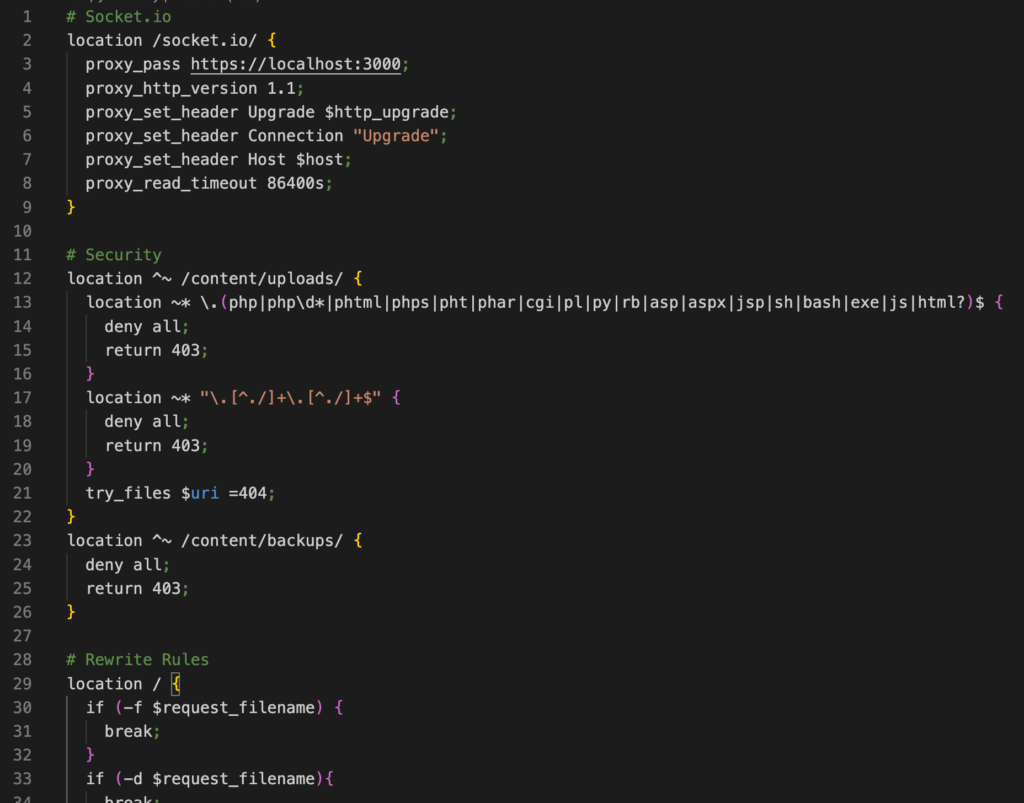
If you are running Sngine on Nginx server make sure you add the following code to your nginx.conf file
# Security
location ^~ /content/uploads/ {
  location ~* \.(php|php\d*|phtml|phps|pht|phar|cgi|pl|py|rb|asp|aspx|jsp|sh|bash|exe|js|html?)$ {
    deny all;
    return 403;
  }
  location ~* "\.[^./]+\.[^./]+$" {
    deny all;
    return 403;
  }
  try_files $uri =404;
}
location ^~ /content/backups/ {
  deny all;
  return 403;
}
To be like this:
Then:
- Empty this folder “content/themes/default/templates_compiled“
- Remove any browser cache and cookies ( Check this to learn how: https://bit.ly/SngineClearCache )
- Only for Cloudflare users, Don’t forget to flush your website cache from Cloudflare
From everyone here at the Sngine team, thank you for your enduring support and we really hope you love this update as much as we do!
That’s it.
Happy Sngine 🙂
Buy Sngine or Extend your support: https://bit.ly/BuySngine