Por kanukp
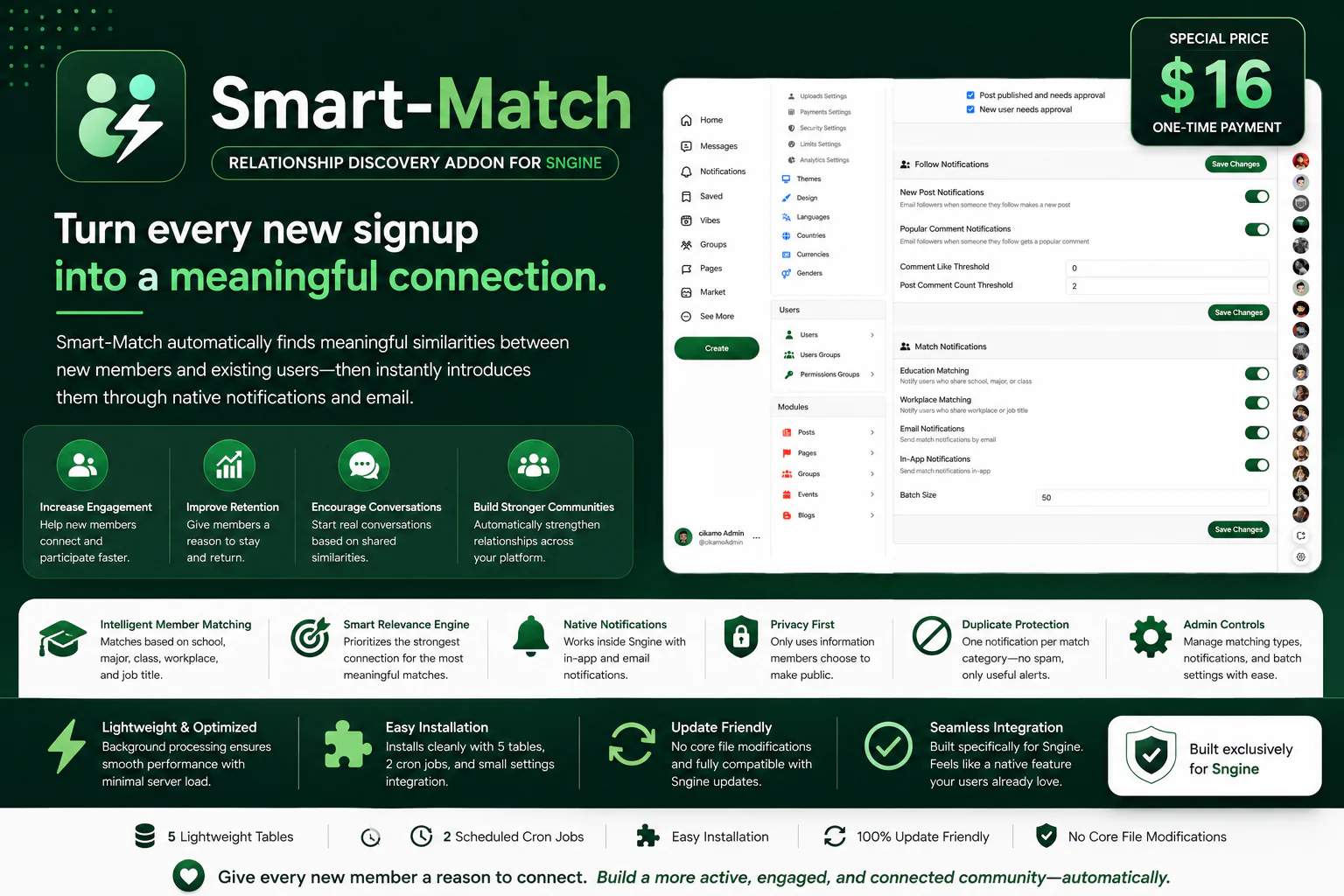
Turn every new signup into a meaningful connection.
Por Myalo
$16.00
Turn every new signup into a meaningful connection.
Smart-Match is a premium member discovery addon built exclusively for Sngine. It automatically detects new members, compares their existing education and workplace information with your current members, and notifies users who share a meaningful connection.
Instead of letting new registrations disappear into your member database, Smart-Match helps your community discover who they already have something in common with.
Imagine a new member joins your website and shares the same school, major, class, workplace, or job title with someone who has already been a member for months.
Smart-Match finds that connection automatically.
For example:
“Hi David, Sarah just joined YOURSITE — you both have Computer Science and class 300 at University of Lagos in common!”
Or:
“Hi David, Sarah just joined YOURSITE — you both work as Software Engineers at Google!”
This turns a simple signup into a potential friendship, professional connection, conversation, or networking opportunity.
How Smart-Match Works
Smart-Match works automatically in the background. Whenever a new member registers, the addon checks the information already available in their Sngine profile and searches your existing members for relevant matches.
1. A New Member Signs Up
A new user joins your Sngine website with education or workplace information available in their profile.
2. Smart-Match Detects Their Information
The addon checks the new member's existing Sngine Education and Work profile information.
3. Existing Members Are Compared
Smart-Match searches existing users for matching schools, majors, classes, workplaces, and job titles.
4. The Strongest Connection Is Selected
Smart-Match prioritizes the most specific and meaningful match instead of treating every similarity equally.
5. Existing Members Are Notified
The existing matched member receives a personalized notification explaining what they have in common with the new member.
6. Optional Email Notification
If enabled, the matched member can also receive the notification by email, encouraging them to return to your website and discover the new member.
Education Matching
Smart-Match uses the education information already available in Sngine to discover meaningful connections between new and existing members.
Same school or university.
Same major.
Same class.
Same school + major.
Same school + major + class.
For example, if a new member has University of Lagos → Computer Science → 300 Level, Smart-Match can identify existing members with matching information and notify them about the new arrival.
Workplace Matching
Smart-Match can also discover professional connections using Sngine's existing workplace information.
Same workplace.
Same workplace + job title.
For example, if a new member works at Google as a Software Engineer, existing members with matching workplace information can be notified about the new arrival.
Intelligent Match Prioritization
Smart-Match doesn't simply look for any similarity. It prioritizes the strongest and most specific connection available.
Education: School + Major + Class → School + Major → School
Workplace: Workplace + Job Title → Workplace
This means members are more likely to receive relevant introductions instead of being flooded with notifications about weak or generic matches.
Personalized Notifications
Smart-Match generates notifications based on the actual information shared between the new member and the existing member.
For an education match:
“Hi David, Sarah just joined YOURSITE — you both have Computer Science and class 300 at University of Lagos in common!”
For a workplace match:
“Hi David, Sarah just joined YOURSITE — you both work as Software Engineers at Google!”
For anonymous matching, the notification can introduce the connection without revealing the new member's identity:
“Hi, someone from University of Lagos just joined YOURSITE! Check out their profile.”
Or:
“Hi, someone working at Google just joined YOURSITE! Check out their profile.”
Who Gets Notified?
Smart-Match is designed to introduce new members to existing members. Only the existing matched member receives the match notification. The new signup is not notified about their own matches.
Works With Sngine's Existing Profile Fields
Smart-Match does not create its own education or workplace profile system. It uses the information already provided through Sngine's existing Education and Work modules.
This means your members do not need to fill out another set of profile fields just for Smart-Match.
Automatic Background Detection
Smart-Match automatically processes new registrations in the background using scheduled processing. It uses a cursor-based background scan of new signups rather than relying on a specific registration hook, allowing it to work regardless of how the user joined your website.
Privacy First
Smart-Match only uses relevant profile information that members have chosen to make public. Private or hidden profile information is not used for matching or revealed to other users.
Safe & Relevant Matching
Banned, unapproved, and deactivated users are automatically excluded from matching on both sides, helping ensure that notifications are only generated for eligible members of your community.
Accurate Matching
Smart-Match uses exact-value matching with whitespace normalization. Extra spaces before or after profile values are ignored, helping prevent formatting differences from stopping otherwise valid matches.
Requirements
Smart-Match is built exclusively for Sngine and uses Sngine's existing profile modules and systems.
PHP: 8.4 or newer — matches the current Sngine requirement.
Sngine: Built and tested on Sngine version 4.4.2/ 4.5+. You need SNGINE for this to work. Buy Sngine from here
Education Module: Sngine's Education module must be activated for education-based matching.
Work Module: Sngine's Work module must be activated for workplace-based matching.
Cron Access: Required for automatic background processing. Most shared hosting providers, including Hostinger and cPanel-based hosting, provide cron access through the hosting control panel.
Database: MySQL or MariaDB with InnoDB support, which is standard on almost all hosting environments.
Important: Smart-Match does not create separate education or workplace profile fields. It relies on the information provided through Sngine's existing Education and Work modules.
Notification Settings & Controls
For Users
Location:
Settings & Privacy → Notifications
Enable or disable Smart-Match notifications.
Enable or disable Smart-Match email notifications.
Opt out of Smart-Match completely.
For Administrators
Location:
Admin Panel → Settings → Notification Settings
Toggle Education Matching.
Toggle Workplace Matching.
Enable or disable In-App Notifications.
Enable or disable Email Notifications.
Configure background batch processing size.
Seamless Sngine Integration
Smart-Match integrates directly with Sngine's existing profile fields, notification system, email system, Settings pages, and Admin Panel.
There is no separate member dashboard, separate messaging system, or additional profile system to learn. Smart-Match works quietly in the background and uses the Sngine experience your members already know.
Why Smart-Match?
Every new registration represents a potential connection. A new student could already know people at the same university. A new employee could work at the same company as another member. Two professionals could have the same workplace and job title.
Smart-Match finds those connections automatically.
✔ Turn new registrations into meaningful connections
✔ Help members discover people they already have something in common with
✔ Increase engagement from new signups
✔ Bring existing members back to your platform
✔ Encourage natural conversations and networking
✔ Build a stronger community automatically
Key Features
Automatic new-member detection.
Education-based matching.
Workplace-based matching.
School matching.
Major matching.
Class matching.
Workplace + job title matching.
Intelligent match prioritization.
Personalized match notifications.
Native Sngine in-app notifications.
Optional email notifications.
Privacy-aware matching.
Public-profile-only matching.
Banned, unapproved, and deactivated user filtering.
Exact-value matching with whitespace normalization.
User notification preferences.
Administrator controls.
Automatic background processing.
Configurable batch processing.
Lightweight and optimized.
No core file modifications required.
Built exclusively for Sngine.
Por kanukp

Por kanukp
Por kanukp