Why you need to clear browser cache after each update?
Understanding Post-Update Behavior in Sngine After updating Sngine, you may encounter unexpected changes in functionality or

Tabla de contenidos

Understanding Post-Update Behavior in Sngine
After updating Sngine, you may encounter unexpected changes in functionality or appearance. This is often due to alterations in core Sngine files, including JavaScript (JS) and Cascading Style Sheets (CSS).
Testing with Incognito/Private Mode
To isolate these changes and verify if they’re related to cached files, use Incognito or Private Mode in your browser. This mode prevents the browser from loading cached resources, providing a fresh view of your site.
- Google Chrome: CTRL+SHIFT+N (Windows) or CMD+SHIFT+N (macOS)
- Microsoft Edge: CTRL+SHIFT+N (Windows) or CMD+SHIFT+N (macOS)
- Firefox: CTRL+SHIFT+P (Windows) or CMD+SHIFT+P (macOS)
The Role of Browser Caching
Modern browsers cache static files like JS and CSS to improve loading times. However, this caching can lead to outdated content after updates.
Clearing Browser Cache for Optimal Performance
To ensure your browser loads the latest Sngine files, it’s essential to clear your cache:
Leveraging CloudFlare for Efficient Cache Management
For a more streamlined approach, consider using CloudFlare’s free plan. CloudFlare provides tools to flush cached static files (JS, CSS, images, etc.) for all your users. This ensures a consistent experience for everyone.
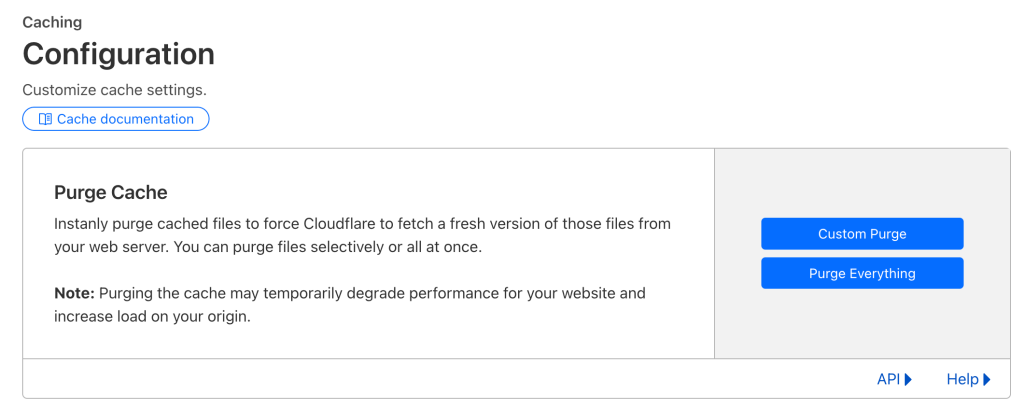
Note: While CloudFlare can be highly effective, it’s still recommended to periodically clear your browser cache for optimal performance.
By following these steps, you can effectively manage post-update behavior in Sngine and provide a smooth user experience.
That’s it.
Happy Sngine 🙂
Buy Sngine or Extend your support: https://bit.ly/BuySngine