Links not working in Sngine? Why?
You have installed Sngine and found that links not working and give you 404 not found
Índice

You have installed Sngine and found that links not working and give you 404 not found error?
You simply check if you have mod_rewrite enabled and you can get that from your server admin or hosting support.
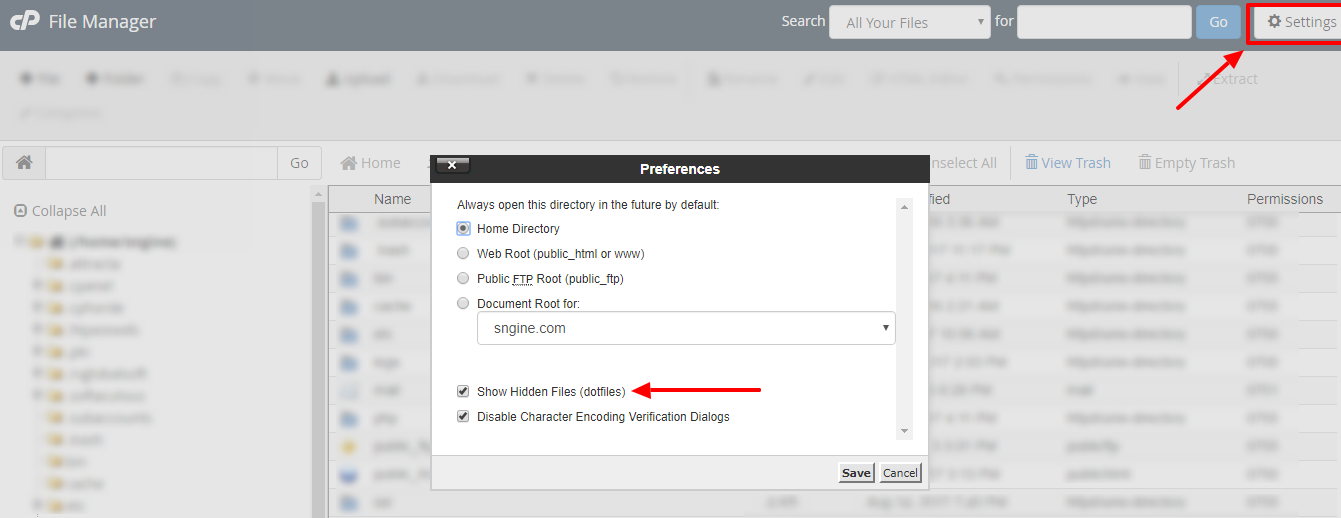
Also check if you have uploaded the htaccess file which already included with the downloaded package but it may be hidden for you if you’re using Mac OS or Linux as it start with dot.

Also when you upload Sngine from cPanel File Manager make sure you have checked the option to show the hidden files
Sngine & Nginx Server:
Check this:
That’s it.
Happy Sngine 🙂
Buy Sngine or Extend your support: https://bit.ly/BuySngine
Artigos relacionados
Primeiros passos, Dicas e tutoriais
How Sngine Helps Combat Spam
 Zamblek
3 min de leitura
Zamblek
3 min de leitura
Primeiros passos, Dicas e tutoriais
How To Set CORS Policy For Google Cloud Bucket?
Zamblek
1 min de leitura
Primeiros passos, Dicas e tutoriais
New Google Playstore’s 12 Testers Policy for Production Release
Zamblek
1 min de leitura