Von kanukp
Bring your users back when the people and conversations they care about become active.
Von Myalo
$14.00
Bring your users back when the people and conversations they care about become active.
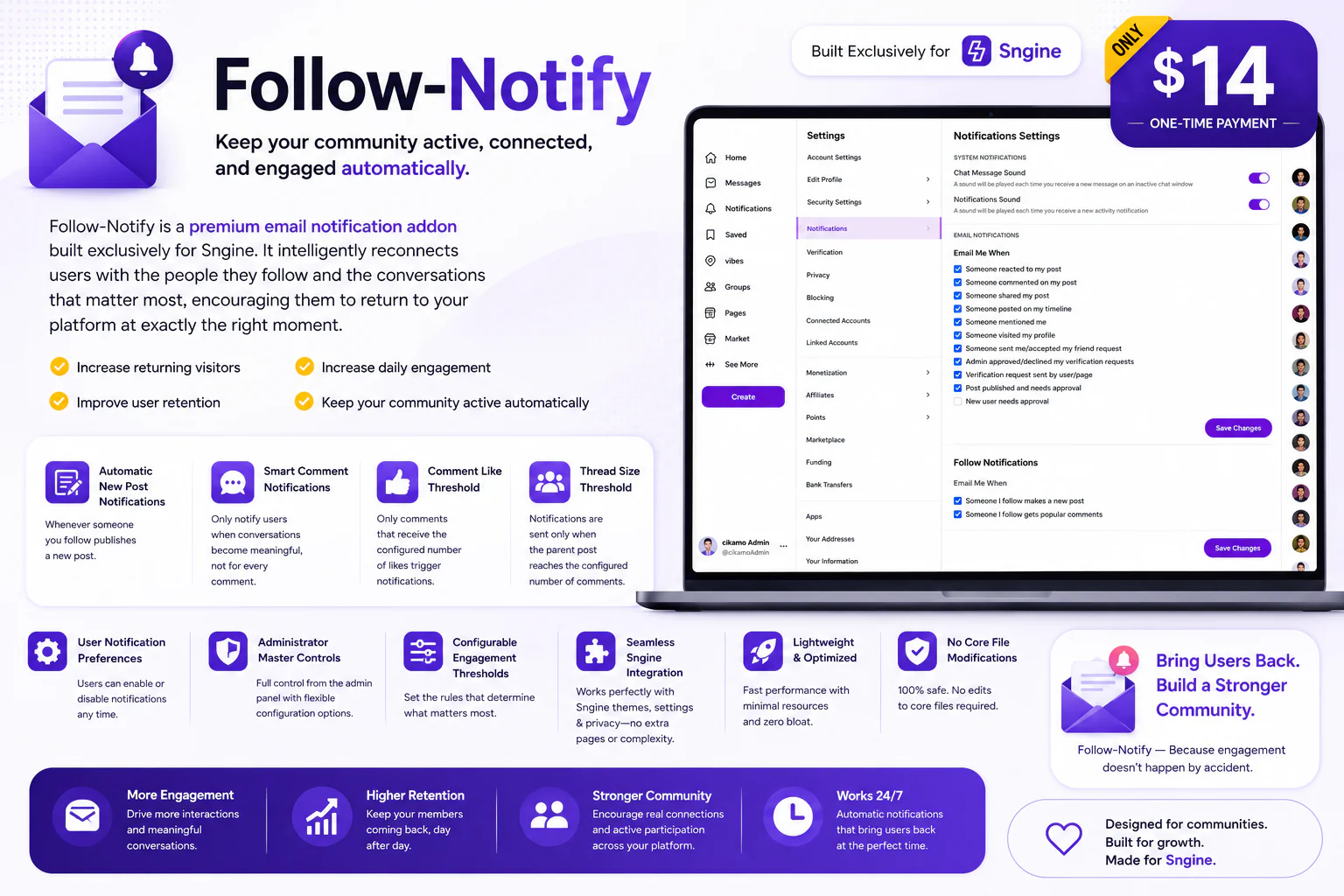
Follow-Notify is a premium email engagement addon built exclusively for Sngine. It automatically emails your users when someone they follow publishes a new post, and notifies them when discussions and comments become popular based on fully configurable engagement thresholds — turning passive followers into active, returning visitors.
Instead of waiting for members to remember to visit your website, Follow-Notify gives them a reason to come back. When someone they follow — or a friend in a discussion — drops a comment that starts gaining traction, they get notified and pulled straight back into the conversation.
Overview
Social communities lose engagement not because members lose interest, but because they simply don't know when something interesting has happened. A user may follow a creator, a friend, or an active contributor — but without a nudge, they never come back to see what that person has posted. Meanwhile, popular discussions quietly fade away because the people who'd want to jump in never see them.
Follow-Notify closes that gap. It watches your community's activity in the background and automatically sends targeted email notifications the moment something worth returning for happens — whether that's a fresh post from someone a user follows, or a comment thread that's clearly caught fire.
✔ Increase returning visitors
✔ Improve long-term user retention
✔ Increase post engagement
✔ Increase discussion and comment activity
✔ Keep your community active — automatically, with zero manual effort
Automatic New Post Notifications
Whenever someone a user follows publishes a new post, Follow-Notify automatically sends that follower a clean, branded email notification — no admin action required.
This gives every follower a direct, personal reason to return to your website and discover new content from the people they've already chosen to follow, rather than relying on them to happen to log in and check.
For example: instead of a follower having to remember to check your website every few days, they receive an email the moment someone they follow shares something new — turning a passive follow into an active engagement loop.
Smart Comments Discussion Notifications
Follow-Notify also notifies users when conversations become genuinely active — but it's careful not to flood inboxes. Rather than firing off an email for every single comment posted, the addon uses configurable engagement thresholds to determine when a discussion has actually earned attention.
This keeps notification volume sensible while still giving your community's best, liveliest conversations the extra visibility they deserve.
Comment Like Threshold
Administrators can set the minimum number of likes a comment must receive before it becomes eligible to trigger a popular-comment notification.
For example, with the threshold set to 5 likes, a comment with only 2 or 3 likes stays quiet — but the moment it crosses 5, it becomes a candidate for notification, ensuring only genuinely well-received comments get pushed to followers.
Thread Activity Threshold
Administrators can also set how many comments a parent post must accumulate before the discussion as a whole becomes eligible for notification.
This lets Follow-Notify focus on threads that have generated genuine back-and-forth activity, rather than sending notifications about a single isolated comment sitting on an otherwise quiet post.
Smart Engagement Filtering
Both thresholds work together: Follow-Notify combines comment-level and thread-level engagement signals to decide when a discussion has crossed the line from "active" to "genuinely popular." This gives administrators fine-grained control over exactly how often popular-discussion emails go out — from very selective to more frequent, depending on how large and active your community is.
Email Notifications
Follow-Notify uses email — the one channel almost every member actually checks — to pull people back into your community. Notifications are generated automatically in the background, helping users discover new posts and active discussions without ever needing to sit refreshing your website waiting for something to happen.
Notification Settings & Controls
For Users
Location:
Settings & Privacy → Notifications
Enable or disable New Post email notifications independently.
Enable or disable Popular Discussion email notifications independently.
Choose to receive both notification types together.
Opt out of Follow-Notify notifications completely, at any time, with one click.
For Administrators
Location:
Admin Panel → Settings → Notification Settings
Enable or disable New Post email notifications site-wide.
Enable or disable Popular Discussion email notifications site-wide.
Configure the Comment Like Threshold to match your community's size and activity level.
Configure the Thread Activity Threshold for what counts as a "popular" discussion.
Automatic Background Processing
Follow-Notify processes notifications automatically in the background using scheduled cron jobs — there's no dashboard button to click, no manual trigger, nothing for admins to remember. Once cron is configured, the addon continuously scans for new posts and qualifying discussions and dispatches notifications on its own, quietly and reliably.
Requirements
Follow-Notify is built exclusively for Sngine and requires the following:
Sngine: Built and tested on Sngine version 4.4.2 and newer, including version 4.5+.
PHP: 8.4 or newer — matching the current Sngine requirement.
Cron Access: Required for automatic background processing. Most shared hosting providers, including Hostinger and cPanel-based hosting, provide cron access directly through the hosting control panel.
Database: MySQL or MariaDB with InnoDB support — standard on virtually all hosting environments.
Email Configuration: Your Sngine website must have working email delivery configured (SMTP recommended) so that generated notifications actually reach your users' inboxes.
Installation & Setup
The included step-by-step guide walks you through the complete setup process, including:
Uploading the addon files to your Sngine installation.
Installing the required database components.
Configuring the required cron jobs on your hosting panel.
Configuring notification settings from the Admin Panel.
Configuring your engagement thresholds to match your community.
Testing the notification system end-to-end before going live.
The setup is designed to be straightforward and beginner-friendly, so you can get Follow-Notify running safely and correctly on the very first installation attempt.
Seamless Sngine Integration
Follow-Notify integrates directly with Sngine's existing user system, Settings & Privacy pages, Admin Panel, and email functionality.
There's no separate member dashboard, no external notification service, and nothing new for users to learn. Follow-Notify simply extends the Sngine experience your members already know, so adoption is instant.
Lightweight & Optimized
All notification processing happens in the background via cron, keeping the live user experience fast and lightweight while your community still receives timely, relevant email notifications.
No Core File Modifications
Follow-Notify is built to work without touching Sngine's core files, so it's easy to install, safe to maintain, and won't get overwritten or broken by future Sngine core updates.
Why Follow-Notify?
Your users already told you who they care about — they followed them. Follow-Notify simply turns those existing relationships into real engagement opportunities.
When someone they follow posts something new, let them know.
When a discussion catches fire, bring them back into the conversation.
Give your members a genuine reason to come back — automatically, every time.
✔ Turn passive followers into returning visitors
✔ Give new posts more visibility from day one
✔ Highlight your community's most active discussions
✔ Reduce unnecessary notification emails with smart thresholds
✔ Increase overall community engagement
✔ Keep members connected automatically, with zero manual work
Key Features
Automatic follower email notifications.
New post notifications for followed users.
Popular discussion notifications.
Configurable Comment Like Threshold.
Configurable Thread Activity Threshold.
Combined, fully configurable engagement thresholds.
Granular user notification preferences.
Administrator master controls.
Fully automatic background processing.
Cron-based notification processing.
Native, seamless Sngine integration.
Lightweight and performance-optimized.
No core file modifications required.
Built exclusively for Sngine.
Von kanukp
Von kanukp
Von kanukp